
Digitally Hooked: Endless Ping
How digital platforms use notifications to pull us back into their world—and what it takes to break the loop.

This is part 2 of a 3-part series on digital addiction. Read the first part here.
In the previous article, we explored how infinite scrolling keeps us glued to screens by removing the finish line. In this one, we will look at the next trick in the attention economy’s playbook: notifications. Because if infinite scroll keeps us inside the platform, notifications make sure we never leave it for too long.
The Invention of the Ping
Before smartphones, communication had a rhythm. You would check your mailbox once a day, or your email when you get to your desk. Now, your pocket buzzes every few minutes. That shift began in 2003, when BlackBerry introduced the push notification, a quick alert that told you when an email arrived. It was a marvel of productivity. No more refreshing your inbox; your phone did it for you.
Soon, other apps also wanted to send you notifications. “You might miss something,” they whispered. Apple launched the APNS (Apple Push Notification Service) in 2009, which allowed third-party apps to send notifications to iPhone users. Before long, an average person was receiving dozens to hundreds of notifications a day.
The problem isn’t just the quantity. It’s the psychology behind them. Notifications aren’t neutral; they’re designed like slot machines—each ping holds the promise of a reward: a like, a message, a breaking headline. Sometimes you get something exciting. Often, you don’t. But your brain pushes you to keep checking, just in case.
The Technology Behind the Buzz
So how does that little vibration reach you at just the right time?
At its core is something called a push notification service. Every major tech ecosystem, Apple, Google, and even Amazon, runs one. Here’s a basic flow of how Apple’s system works:
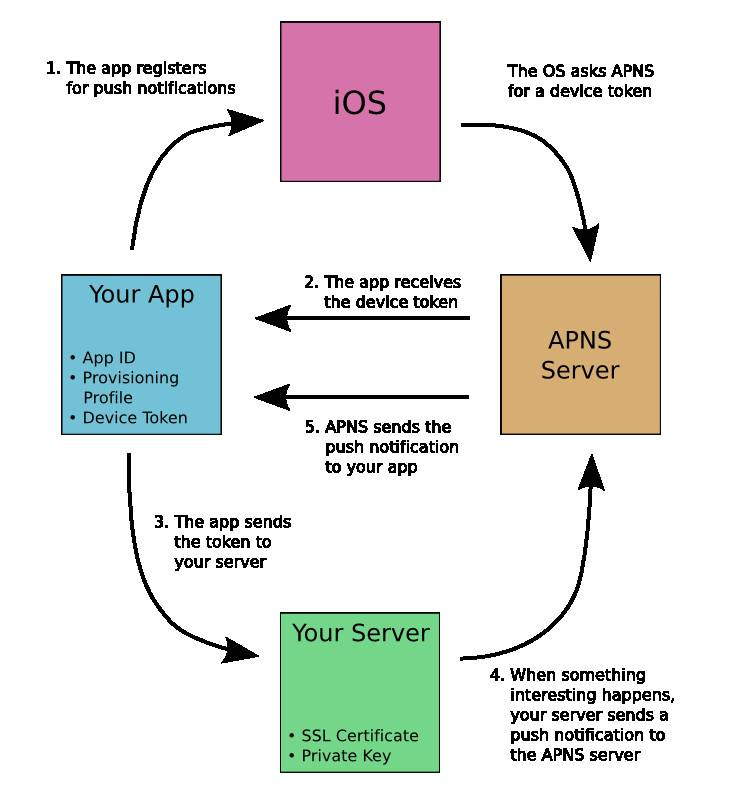
Step 1: The app registers for push notifications
When you install or open an app for the first time, it politely asks your permission to send notifications—that’s the moment when it’s registering.
Behind the scenes, your iPhone’s operating system (iOS) reaches out to APNS and says: “Hey, I’ve got a new app that wants to send notifications. Can I get a unique ID for this phone?”
This step is like you signing up for a postal mail service.
Step 2: The app receives the device token
Once APNS verifies the request, it gives back something called a device token — a long string of letters and numbers that acts like a digital address for your device.
Thus, APNS gives your app a unique mailbox number that says, “This is exactly where to send messages meant for this user on this device.”
The app now stores that address carefully for later use.
Step 3: The app sends the token to its server
Now that the app has your device’s address (device token), it sends that address to its company’s main server — the app’s headquarters.
Think of this like a store collecting your address when you sign up for delivery. The company needs it to send you future updates.
For example, Instagram stores your device token on its servers so that when someone likes your photo, it knows exactly which device should get the “❤️” notification.
Step 4: Your server sends a push notification to the APNS server
This is where the magic happens. When something noteworthy occurs, say, you get a new follower or message, the app’s server prepares a notification and sends it to APNS.
It’s like a store creating a message (“Your order has shipped!”) and then handing it over to the postal system (APNS) for delivery.
The server contains:
Your device token (so APNS knows where to send it), and
Its SSL certificate and private key, which prove it’s a verified sender. It is like showing your ID before mailing a parcel.
Step 5: APNS sends the notification to your app
Finally, APNS takes the message and forwards it to your device using the token as an address.
Your phone receives it, iOS displays it, and you see that familiar ping or banner on your screen.
This is like the postal carrier finally dropping the letter in your mailbox and ringing the bell.
If your device is offline, APNS waits patiently and delivers the message as soon as you reconnect, ensuring no update gets lost in transit.
All of this happens in milliseconds.
Now, what makes it clever and addictive is that notifications are personalized and timed. Algorithms decide when you’re most likely to respond. If you usually check your phone after dinner, the app waits until then to ping you. It’s like your phone saying, “Hey, I know you’re free now.”
When the Buzz Becomes the Hook
Notifications blur the line between communication and manipulation. The original intent, to inform, has now evolved into a system that interrupts and manipulates.
Every time your phone buzzes, a part of your brain called the amygdala (emotional center) is activated, and the prefrontal cortex (responsible for focus) is suppressed. This results in a cycle of dopamine-driven anticipation, an emotionally charged reaction, and a struggle to focus due to the brain’s shifting priorities.
You’re not weak-willed. You’re wired.
The business model behind it is simple: your attention is the product. The more time you spend on an app, the more ads you see, and the more data you generate. That’s why companies compete to send the most interesting alerts. Here is one such example from a food delivery app, Zomato:
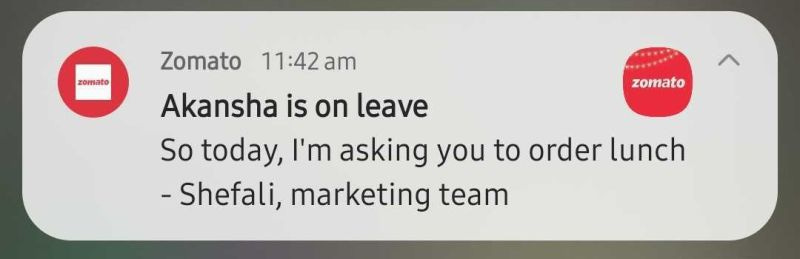
It’s why YouTube nudges you with “New video from your favorite creator”, Instagram reminds you that “You haven’t posted in a while”, and LinkedIn asks you to congratulate someone on their promotion. Every buzz is a tiny pull at your time, wrapped in the language of relevance.
The Cost of Constant Interruptions
Notifications have quietly reshaped how we work, rest, and relate.
At work, they fragment attention. Studies show that it can take 23 minutes and 15 seconds to refocus after an interruption. Multiply that by dozens of daily alerts, and productivity quietly bleeds away.
In personal life, they fracture presence. You could be mid-conversation when a screen lights up and your focus drifts. We’ve all felt that sting of disconnection—the way a ping can pull someone away even when they’re right beside us.
There’s also an emotional toll. Many notifications are designed to trigger FOMO (fear of missing out). That red dot or number on top of an app doesn’t just inform—it implies urgency. If you don’t tap, you might miss a trend, a text, or a small slice of social belonging.
Breaking Free from Endless Pings
Here’s how you can reclaim control of your attention:
Audit Your Alerts: Review every app’s settings and disable anything non-essential. Keep only functional notifications, such as calls, messages, and calendar reminders. Everything else is digital noise.
Batch Your Attention: Check notifications at fixed intervals instead of reacting instantly. Treat them like mail—open your “inbox” twice a day.
Use Do Not Disturb (DND) Intentionally: Set quiet hours, especially before bed and while doing deep work. Even seeing a notification can break focus, so silence them entirely during key moments. Keep your phone upside down to avoid seeing notifications as well.
Remove the Red Dot: Turn off notification badges. They’re not reminders; they’re bait.
Understand the Game: Self-awareness itself is very powerful. The next time your phone buzzes, pause and ask: “Who benefits from this interruption, me or the app?”
You can’t win a game that’s rigged against your biology, but you can step outside of it.
What’s Next?
If infinite scroll and notifications are the tools of digital addiction, algorithms are the architects behind them. They decide what we see and when we see it.
In the next and last part of Digitally Hooked, we’ll explore the invisible hands that shape our feeds and thoughts.
Glossary
Private Key: A secret code that a device uses to prove its identity. Like a master key—if stolen, someone could impersonate that device.
Provisioning Profile: A permission slip that lets an app run on Apple devices and use services like notifications.
SSL Certificate: SSL stands for Secure Sockets Layer. It is a digital security badge that encrypts data between an app and a server, like sealing a letter in an envelope.
Note: This article may be edited post-publication for enhanced clarity, accuracy, and readability.